
Send leads to your CRM with webhooks
Vesperdesk can send every new lead, and every change to it, to a web address you choose: your own system, a Zapier Zap or a Make scenario. Each delivery is a signed JSON POST, retried if your side is down and listed in a delivery log. This page explains how to set it up, what the payload contains and how to check the signature.
Add a webhook
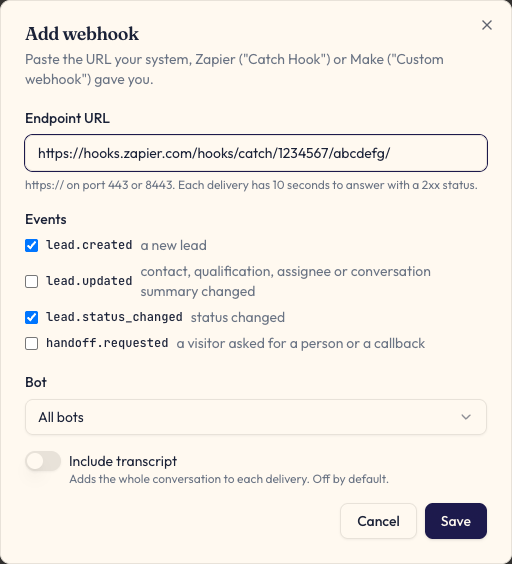
In the Vesperdesk admin, open Integrations in the sidebar and click Add webhook. Only a company owner can add a webhook (editors can test it, read its log and switch it on or off); a company can have up to 5 webhooks.
- Endpoint URL: an https:// address on the public internet, on port 443 (the default) or 8443. Private, loopback and cloud-metadata addresses are refused, and the address is checked again before every delivery. Only an owner can change the URL or turn on the transcript.
- Events: lead.created (a new lead), lead.updated (contact details, qualification or assignee changed, or the conversation summary was added), lead.status_changed (the status changed in Vesperdesk) and handoff.requested (a visitor asked for a person or a callback).
- Bot: send the leads of one bot, or of all bots.
- Include transcript: off by default. When on, each delivery also carries the conversation so far in a transcript field, up to 50,000 characters.
- After saving, copy the signing secret. It is shown only once; Rotate secret replaces it, and the old secret stops working at once.
- Send test event posts a sample lead (with "test": true) so you can map fields before a real lead arrives.
Connect Zapier
Zapier receives webhooks through its Webhooks by Zapier app, which needs a paid Zapier plan. The free plan cannot use it.
- In Zapier, create a Zap and choose the trigger Webhooks by Zapier, event Catch Hook. Copy the webhook URL Zapier shows.
- In Vesperdesk, add a webhook with that URL and click Send test event.
- Back in Zapier, click Test trigger: the sample lead appears with every field.
- Add an action, for example HubSpot (create contact), Pipedrive (create person and lead) or Google Sheets (create row), and map the fields.
Connect Make
In Make, add the Webhooks app with the Custom webhook trigger and create a new webhook. Copy its address, add it as a webhook in Vesperdesk and click Send test event: Make learns the data structure from that delivery. Then add the modules for your CRM.
What each delivery contains
Every delivery is an HTTPS POST with a JSON body and these headers: X-Vesperdesk-Signature (see below), X-Vesperdesk-Delivery (a delivery id that stays the same on every retry, so you can ignore duplicates) and X-Vesperdesk-Event (the event name).
The body is flat: every value is text, a number, true/false or null, so Zapier and Make can map each field directly. Fields that are not known are null. version is 1; new fields may be added, but existing ones will not be renamed or removed without a new version. conversation_summary is written when the conversation ends, so it is usually null on lead.created; Vesperdesk then sends lead.updated with it. The transcript field is present only when Include transcript is on.
{
  "version": 1,
  "event": "lead.created",
  "event_id": "01JBX7Q3M8S5W2N4K6P9R0T1V3",
  "occurred_at": "2026-11-01T10:00:00.000Z",
  "test": false,
  "lead_id": "6724a1f0c3b2a1d4e5f60789",
  "lead_created_at": "2026-11-01T10:00:00.000Z",
  "bot_id": "6724a1f0c3b2a1d4e5f60001",
  "bot_name": "Casa Lisboa",
  "source": "portal",
  "portal_name": "idealista",
  "campaign_name": null,
  "qr_label": null,
  "status": "new",
  "previous_status": null,
  "assignee_name": null,
  "assignee_email": null,
  "contact_name": "Ana García",
  "contact_email": "ana@example.com",
  "contact_phone": "+34600000000",
  "contact_language": "pt",
  "enquiry": "T2 in Alfama",
  "notes": "Can I see it on Saturday?",
  "listing_reference": "REF-1234",
  "listing_title": "T2 in Alfama",
  "listing_url": "https://agency.example/ref-1234",
  "deal_type": "sale",
  "budget_min": null,
  "budget_max": 350000,
  "budget_currency": "EUR",
  "location": "Lisbon",
  "property_type": "apartment",
  "layout": "T2",
  "timeline": "within_3_months",
  "preferred_contact": "whatsapp",
  "conversation_summary": null,
  "handoff_id": null,
  "handoff_kind": null,
  "handoff_reason": null,
  "admin_url": "https://admin.vesperdesk.com/leads?lead=6724a1f0c3b2a1d4e5f60789"
}
Retries and the delivery log
Your endpoint has 10 seconds to answer with a 2xx status. Any other answer, a timeout or a redirect counts as a failure (redirects are not followed). Vesperdesk then retries after 1 minute, 5 minutes, 30 minutes, 2 hours and 6 hours, and marks the delivery failed after the last retry.
The delivery log in Integrations keeps the last 100 deliveries of each webhook, for up to 30 days, with the event, result, status code, response time and number of attempts. A failure shows as one short code: http_<status>, timeout, connection_refused, tls_error, dns_error or blocked. Redeliver sends a finished delivery again with the same id and body.
After 50 failed deliveries in a row (each one failed after all its retries), the webhook is switched off and the company owners get an email. Leads keep arriving in Vesperdesk, but leads that arrive while the webhook is off are not sent to it, not even after you turn it back on.

Check the signature
X-Vesperdesk-Signature looks like t=1761991200,v1=5f2b…. t is the Unix time of the attempt, and v1 is the hex HMAC-SHA256 of the text t, a dot and the raw request body, keyed with your signing secret. Compute the same value over the raw body (before any JSON parsing), compare in constant time, and reject requests whose t is more than 5 minutes old.
// Express: keep the raw body; the signature covers the exact bytes sent.
const crypto = require('node:crypto')
const express = require('express')

const SECRET = process.env.VESPERDESK_WEBHOOK_SECRET
const app = express()

app.post('/vesperdesk', express.raw({ type: 'application/json' }), (req, res) => {
  const header = req.get('X-Vesperdesk-Signature') || ''
  const parts = Object.fromEntries(header.split(',').map((part) => part.split('=')))
  const expected = crypto
    .createHmac('sha256', SECRET)
    .update(`${parts.t}.${req.body}`)
    .digest('hex')
  const given = Buffer.from(parts.v1 || '', 'hex')
  const fresh = Math.abs(Date.now() / 1000 - Number(parts.t)) < 300
  if (!fresh || given.length !== 32 || !crypto.timingSafeEqual(given, Buffer.from(expected, 'hex'))) {
    return res.sendStatus(401)
  }
  const lead = JSON.parse(req.body)
  // Deduplicate on req.get('X-Vesperdesk-Delivery'): retries repeat the same id.
  res.sendStatus(200)
})# Flask: request.get_data() is the raw body the signature covers.
import hashlib, hmac, os, time
from flask import Flask, request, abort
SECRET = os.environ["VESPERDESK_WEBHOOK_SECRET"].encode()
app = Flask(__name__)
@app.post("/vesperdesk")
def vesperdesk():
body = request.get_data()
parts = dict(p.split("=", 1) for p in request.headers.get("X-Vesperdesk-Signature", "").split(",") if "=" in p)
t, v1 = parts.get("t", "0"), parts.get("v1", "")
expected = hmac.new(SECRET, f"{t}.".encode() + body, hashlib.sha256).hexdigest()
if abs(time.time() - int(t)) > 300 or not hmac.compare_digest(expected, v1):
abort(401)
lead = request.get_json()
# Deduplicate on request.headers["X-Vesperdesk-Delivery"]: retries repeat the same id.
return "", 200<?php
// php://input is the raw body the signature covers.
$secret = getenv('VESPERDESK_WEBHOOK_SECRET');
$body = file_get_contents('php://input');
parse_str(str_replace(',', '&', $_SERVER['HTTP_X_VESPERDESK_SIGNATURE'] ?? ''), $parts);
$t = $parts['t'] ?? '0';
$expected = hash_hmac('sha256', $t . '.' . $body, $secret);
if (abs(time() - (int) $t) > 300 || !hash_equals($expected, $parts['v1'] ?? '')) {
http_response_code(401);
exit;
}
$lead = json_decode($body, true);
// Deduplicate on $_SERVER['HTTP_X_VESPERDESK_DELIVERY']: retries repeat the same id.
http_response_code(200);Frequently asked
- Does Vesperdesk update leads that I change in my CRM?
- No. Webhooks go one way, from Vesperdesk to your system. Status changes you make in Vesperdesk are sent as lead.status_changed.
- Is the whole conversation sent?
- Only if you turn on Include transcript for that webhook. By default a delivery carries the lead and its qualification, plus a short conversation summary once the conversation has ended.
- Can I send leads to my own server without Zapier or Make?
- Yes. Any https:// endpoint that answers with a 2xx status works. Check the signature with your secret as shown above.